

Choosing among the best wireless controllers for pc gaming is less about crowning one winner and more about matching a pad to your hands, your games and your desk. Layout, connection type and battery style change how a controller feels every single day.
This guide runs through the brands worth considering, from plug-and-play defaults to fully customised pro pads. It then covers the practical details that decide long-term satisfaction: connection reliability, charging habits, stick technology and comfort over long sessions.
By the end, you should know which style of controller suits the games you play. You will also have a short set of checks to run before buying, and during the first week after it arrives.
Wireless Controllers for PC Gaming at a Glance
The short version, before the detail: every brand below makes a workable PC pad, but each one is built around a different priority.
| Brand | Best for | Connection | Standout trait |
|---|---|---|---|
| Xbox | Plug-and-play Windows gaming | Bluetooth, USB-C | Native support in most PC games |
| Sony | Players who also own a PS5 | Bluetooth, USB-C | Adaptive triggers and haptics |
| Razer | Competitive customisation | Wireless and wired modes | Remappable buttons, tuned triggers |
| 8BitDo | Multi-platform flexibility | 2.4GHz, Bluetooth, wired | TMR sticks, charging dock |
| GameSir | Pro features on a budget | 2.4GHz, Bluetooth, wired | TMR sticks, 1,000Hz polling |
| Scuf | Serious competitive play | Wireless and wired modes | Rear paddles, tailored fit |
Neither column settles the choice on its own. The right row is the one whose trade-offs match the games at the top of your library.
1. Razer
Razer builds controllers for players who want responsive inputs and plenty of customisation. Several models add remappable buttons, adjustable triggers and swappable parts, so the pad can be tuned to a particular game or play style.
The range sits toward the premium end, and some models switch between wireless and wired play. That flexibility suits competitive players who want low-latency options without giving up a tidy, cable-free desk.
2. Xbox
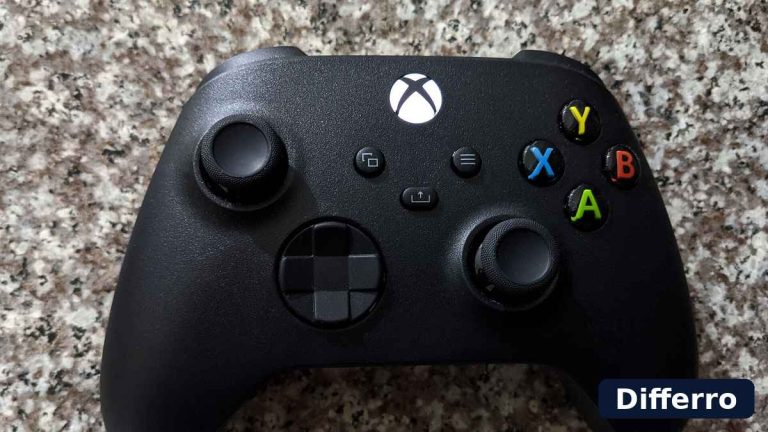
Xbox controllers are the default recommendation for Windows gaming, because support is built into the operating system and most PC games. The offset stick layout, analogue triggers and familiar shape need almost no configuration before you start playing.
Recent models connect over Bluetooth or USB-C, run on replaceable AA batteries, and most games display matching on-screen prompts automatically. Players who want the least friction between buying and playing usually start here.
The step-up option is the Elite Wireless Controller Series 2, which adds adjustable-tension thumbsticks, shorter hair trigger locks and interchangeable components. It stores up to three custom profiles and pairs with PC over Xbox Wireless or Bluetooth.
3. Sony
Sony’s DualSense is designed for the PlayStation 5 but works with compatible PC games, wired or wirelessly. Its standout features are adaptive triggers and detailed haptic feedback, which supported titles use to add resistance and texture to actions.
Sony notes that on PC those headline features may need a USB connection and only work where the game supports them. Treat them as a bonus rather than a guarantee when comparing pads.
The symmetrical stick layout and solid build still make it a strong pick. It suits players who also own the console, or who simply prefer both sticks sitting level at the bottom.
4. 8BitDo
8BitDo specialises in controllers that work across several platforms, from PC to consoles and mobile. Its range covers traditional gamepad shapes as well as compact and retro-inspired designs that appeal to fans of older games.
Many models offer multiple connection modes and button remapping through companion software. Several include a charging dock, which keeps the pad powered and gives it a permanent home on the desk between sessions.
5. GameSir
GameSir focuses on value, packing features into controllers that cost less than the big-name competition. Its Cyclone 2 shows the formula: magnetic TMR sticks, Hall effect triggers with a hair-trigger mode, and a 1,000Hz polling rate over wired and 2.4GHz connections.
The Cyclone 2 carries an 860mAh rechargeable battery and connects three ways: Bluetooth, 2.4GHz or a cable. Customisation runs through the GameSir Connect app on supported models, covering mapping and sensitivity.
For players who like to experiment with settings without paying premium prices, GameSir is worth a close look. The trade-off is a smaller battery than some rivals, so heavy players may charge more often.
6. Logitech G
Logitech G is better known for keyboards, mice and headsets, but it also produces controllers for PC players. Choosing one can make sense if the rest of your setup already uses the brand’s software and accessories.
Its gamepad line is smaller than most rivals here, so check the exact model carefully. Confirm that your games recognise it properly, and compare its connection options against the more controller-focused brands before deciding.
7. Turtle Beach
Turtle Beach built its name on gaming headsets and has applied that console experience to controllers for Xbox and PC. Its wireless models aim at players who want extra control without moving to a specialist pro pad.
Depending on the model, features can include programmable buttons, adjustable trigger settings and onboard profiles. Those options help when you switch between shooters, racers and sports games that each demand different inputs.
8. PowerA
PowerA produces officially licensed controllers and accessories across several platforms, with an emphasis on everyday practicality. Its wireless models use familiar layouts and straightforward controls that suit casual and family gaming.
The brand covers a wide spread of price points, so it is a natural starting point for a first wireless pad or a spare for guests. Many models use replaceable batteries, which makes swapping in fresh power quick.
9. Scuf Gaming
Scuf Gaming builds performance controllers for players who treat customisation as part of the game. Rear paddles, adjustable triggers and interchangeable thumbsticks let you keep your thumbs on the sticks while accessing extra actions.
That control comes at the premium end of the market, and the benefit shows most in competitive titles where fractions of a second matter. For serious players, the tailored fit can justify the investment.
10. 8BitDo Pro-Level Options
Alongside its retro designs, 8BitDo offers higher-specification controllers for players who want more from the same brand. These models add finer customisation, extra connectivity choices and a more conventional modern gamepad shape.
The flagship Ultimate 2 Wireless uses TMR joysticks, polls at 1,000Hz over 2.4GHz and wired connections, and ships with an integrated charging dock. It also adds pro back paddles and extra remappable bumpers.
Software support covers remapping, stick curves and trigger behaviour, so one pad can serve several genres. It is a good route for players who like 8BitDo’s approach but need something more substantial for demanding games.
Benefits of Wireless PC Controllers
The clearest benefit is freedom of movement. Without a cable tying you to the desk, you can lean back, sit on a sofa, or play on a PC connected to a television across the room.
A wireless pad also keeps the gaming area tidier. Fewer cables crossing the desk means fewer snags, less wear on connectors, and an easier time rearranging monitors, keyboards and other equipment.
Hall Effect Sticks and Stick Drift, Explained
Traditional analogue sticks read movement through physical contact inside the sensor, and that contact wears down over time. The result is stick drift, where a character or camera moves even though the stick sits untouched at centre.
Hall effect sticks replace that contact with magnetic sensors, so there is far less to wear out. TMR sticks, used by 8BitDo and GameSir flagships, refine the same magnetic idea for finer precision and lower power draw.
More controllers now offer magnetic sticks, and they are worth prioritising if you play daily. A pad bought for years of service should not develop a wandering camera within the first one.
Connection and Compatibility
Wireless controllers connect in different ways, mainly Bluetooth or a dedicated 2.4GHz USB receiver. A dedicated receiver usually offers a more stable link with lower latency, while Bluetooth is convenient because most laptops and many desktops already support it.
Polling rate is the other half of responsiveness: it counts how often the controller reports its position each second. Mainstream pads report far less often than the 1,000Hz that current 8BitDo and GameSir flagships manage over 2.4GHz.
Before buying, check that the controller supports your operating system and preferred connection method. Most modern PC titles expect an Xbox-style XInput controller, so confirm your games will recognise the pad directly.
Battery Life and Charging
Battery arrangements fall into two camps. Built-in rechargeable batteries charge over USB between sessions, which is convenient and tidy, while replaceable batteries let you swap in a fresh set and keep playing immediately.
Capacity alone does not tell the whole story: lighting, vibration and connection type all change how fast a charge drains. A modest cell paired with a charging dock can suit a daily player better than a bigger battery charged by cable.
Whichever style you choose, consider how the pad fits your routine. Occasional players cope fine either way, but daily players feel the difference within the first week.
Symmetrical or Offset Sticks: Choosing a Layout
Controllers split into two layout families. Xbox-style pads place the left stick high and the D-pad low, while PlayStation-style pads keep both sticks level at the bottom. Neither is objectively better; hands simply prefer one or the other.
Think about the games you play most. Stick-heavy shooters and racers often suit the offset layout, while 2D platformers and fighting games that live on the D-pad can feel more natural on a symmetrical pad.
Choosing the Right Wireless Controller
Start with your games. Racing and sports titles reward smooth analogue sticks and triggers, while fast action games benefit from extra programmable buttons that keep essential actions under your fingers.
Then judge comfort honestly. Grip shape, weight and button reach decide how a controller feels in hour three, so reviews from players with similar hand sizes are more useful than headline features.
The same test-and-adjust mindset applies to your in-game setup: our Ready or Not loadout guide shows how small equipment changes alter performance in a demanding tactical shooter. Hardware and settings reward the same careful tuning.
How to Test a New Controller in the First Week
Connect the controller both ways it supports and play the same game on each, watching for dropouts or delayed inputs. Test every button, trigger and stick direction, including full stick circles in a calibration screen.
Check the battery routine early: run it down in normal play, then time a recharge or swap. If anything feels off, raise it within the return window rather than hoping it improves.
Common Mistakes When Buying a Wireless PC Controller
The most common mistake is buying on headline features alone. Adaptive triggers, lighting and extra buttons mean little if the pad’s layout fights your hands through every long session.
The second is ignoring the connection type. A Bluetooth-only pad paired with a weak desktop adapter can feel laggy, while a 2.4GHz receiver model would have felt instant on the same machine.
The third is skipping stick technology to save money. Players who game daily wear through contact-based sticks fastest, and drift usually appears long after the return window has closed.
How Much Should You Spend on a Wireless Controller?
Spending falls into three rough tiers. Everyday pads from licensed brands cover casual play cheaply, while value flagships such as GameSir’s Cyclone 2 launched at $49.99 in November 2024 with pro-grade sticks and polling.
The middle tier buys the platform defaults and dock-equipped models from 8BitDo. The top tier, home to Scuf and Elite-style pads, charges for paddles, swappable parts and deep software tuning.
Spend against your hours, not your ambitions. A pad used every evening earns its upgrades quickly; one used monthly is better bought simple and replaced sooner.
Care and Maintenance: Making a Controller Last
Keep the pad somewhere consistent between sessions, ideally on its dock or in a drawer, rather than loose among cables. Dust and grit around the sticks are the everyday enemies of smooth movement.
Update firmware when the maker’s app offers it: 8BitDo, PlayStation and Xbox all ship fixes that improve connection stability and stick behaviour. A five-minute update can cure faults that look like hardware failures.
Wipe grips and buttons with a slightly damp cloth, and keep drinks away from the desk edge. Small habits like these decide whether a controller still feels tight in year three.
Frequently Asked Questions
Do wireless controllers have input lag on PC?
Modern wireless controllers add very little delay, and most players cannot feel it in ordinary games. A 2.4GHz receiver connection is generally the lowest-latency wireless option, while Bluetooth can vary with the adapter and environment.
Can I use one controller for PC and console?
Often, yes. Many controllers pair with several platforms, though usually with one device at a time, so you may need to re-pair when switching. Check the model’s listed platforms before relying on it for both.
Are Hall effect sticks worth it?
For regular players, usually yes. They resist the wear that causes stick drift, so the controller stays accurate for longer. Casual players who replace pads often may notice the benefit less.
How long do controller batteries last?
It varies widely by model, the brightness of lighting features and how much vibration is used. Rechargeable models are typically charged every few days of play; replaceable batteries can be swapped instantly when they run low.
Conclusion
The right wireless controller is the one that disappears into the game: comfortable for hours, reliable on your connection of choice, and matched to the genres you actually play. The brands above cover every style, from plug-and-play simplicity to fully customised pro pads.
Weigh compatibility, connection type, battery routine and stick technology before features you may never use. A careful choice now means a controller that still feels right years from now.

